Hi everyone! 
We’ve brought you an exciting new development for Vaperina! 
The #off-topic:music category is super popular, but we saw a challenge: all the great music quickly gets lost among thousands of posts. We wanted the community-built “Vaperina Playlist” to keep going while you browse the site. That’s why we created the YouTube Mini Player!
What is it really?
The Mini Player allows a video started in a music topic to keep playing even if you navigate away from it. We designed the system to be unobtrusive, yet readily available.
How does it work?
If, for example, you start a video in the What are we listening to today? - Retro Line topic, the system automatically detects other music and creates a continuous playlist from them. You’ll find this player in the header, so you can control it from anywhere on the site.
Appearance and Controls:
-
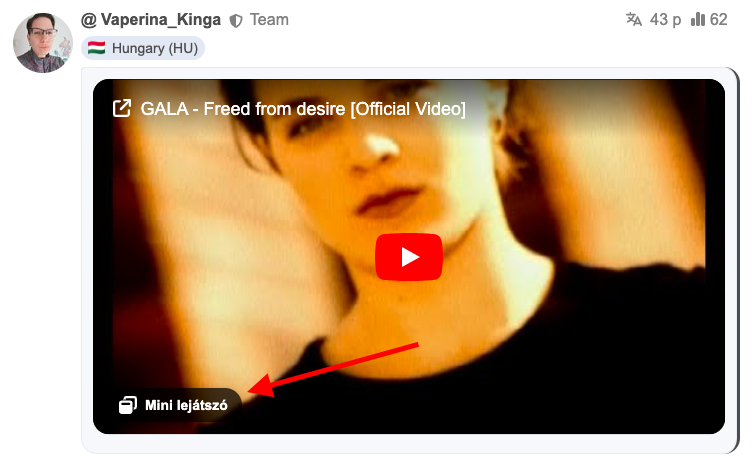
Start Mini Player: You can start it by clicking the Mini Player button that appears in the bottom left corner of YouTube videos.
-
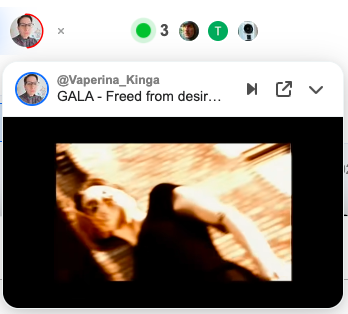
Progress Ring: The profile picture of the user who shared the song appears in the header. A prominent Progress Ring (a continuously updating arc) around the avatar shows where the song is in its playback.
-
Quick Close: You can stop the player completely at any time by clicking the small X button next to the profile picture.

-
Control Panel: The control interface can be opened (or hidden) by clicking the avatar, where you’ll see the song title and the uploader.
-
Function Buttons:
- Next: Skip to the next song in the list.
- Jump to Post: This button takes you back exactly to the post where the music was played, allowing you to react immediately.
- Collapse: Hides the video, but the music continues to play in the background.
We hope this makes your time on Vaperina even more enjoyable and enhances our shared listening experience! Feel free to test it out and let us know what you think.

 Music is always needed. (Do you happen to have a cracked YouTube player?
  )
)