Hi everyone 
To help you quickly skim through your own e-books, studies, and documents, we’ve brought a new tool!
When you read traditional text, your eyes constantly jump between lines and words (this is called saccadic eye movement). 80-90% of our reading time is not processing the text itself, but our eyes physically moving on the page / screen!
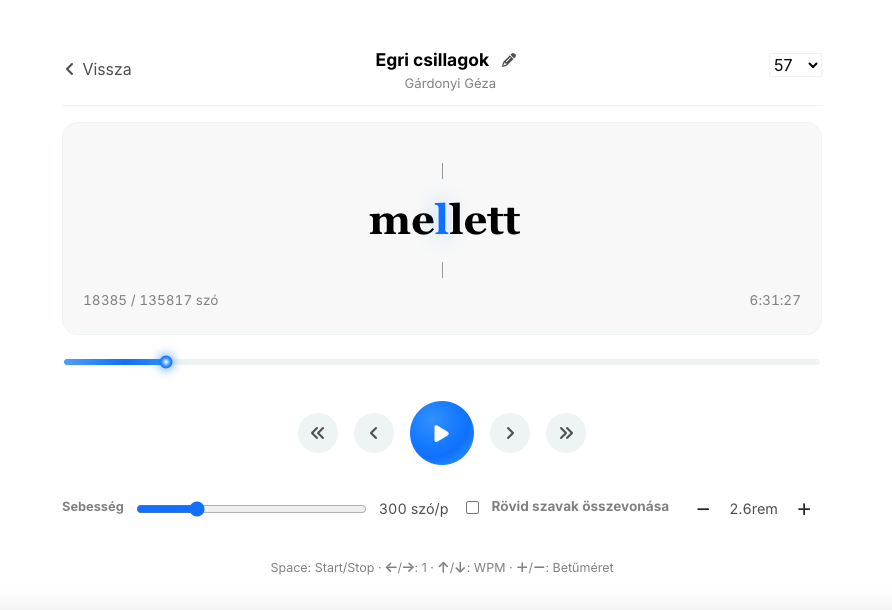
This is replaced by RSVP (Rapid Serial Visual Presentation):
- It projects words one after another onto a single fixed point.
- Your eyes don’t need to move at all.
- The center of the words – the so-called Optimal Recognition Point (ORP) – always appears as a highlighted blue letter in the crosshairs, so your brain immediately identifies the word.
The result? Reduced eye strain, maximum focus, and reading speeds of up to 400–600 words per minute instead of the usual 200.
I believe it can help many people read faster, just like it helped me, so I’ve created one for Vaperina so you can access it quickly and comfortably too! 
How to Use It?
- Open the
 Speed Reader menu item from the sidebar.
 - Upload your own book or document (
.epub,.pdf,.docx,.txt,.md)! - Start it and set a comfortable pace for you!
The system continuously saves your settings and your progress.
 Keyboard Shortcuts for an Even More Comfortable Experience:
Space: Start / Stop← / →: Step word by word↑ / ↓: Adjust speed (WPM)+ / -: Modify font size
 What’s Your Reading Speed?
We’re curious where everyone’s comfort zone is! Try it out and write in the comments:
- At how many words per minute (WPM) did you read comfortably?
- What was your first impression? (It might feel strange to your eyes for the first 1-2 minutes, but the brain adapts incredibly quickly!)
We welcome all feedback and ideas.